


Most of times, while using idm serials or cracks or keygen, we face an error "Internet Download Manager has been registered with a fake serial number". And in most cases, I have seen that users are unable to solve it. So today I will show you how to remove this error.
Trick-1
1) Exit IDM from the taskbar before entering the serial.
2) Disconnect active connections to the internet.
3) Then go to the directory C:\Windows\system32\driver(s)\etc and locate
the file 'hosts'
4) Open the "hosts" file with "notepad".
5) On the last line enter the following address as shown and save.
127.0.0.1 www.internetdownloadmanager.com
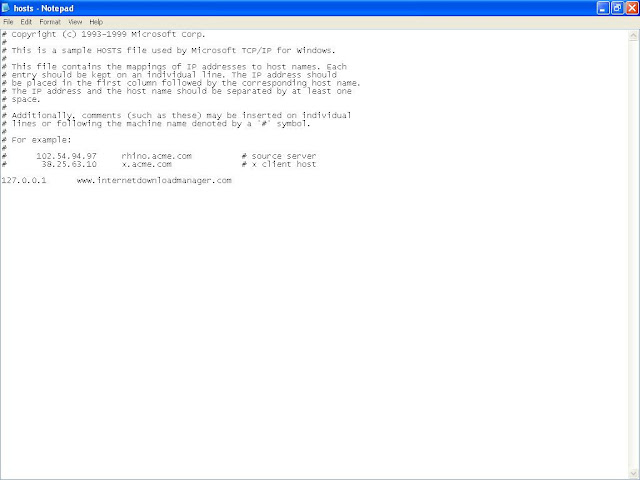
6) Now, again enter the "fake serial" and wait for few seconds.
7) your IDM is registered again.
8) No wonder you would be facing this problem again but without panic use a "new fake key"
But is not alwasy that this trick works. Due to IDM updates, this trick doesnot work now in most cases. So here is the another trick.
Trick-2
1) Remove Internet Download Manager from your computer. You can use Revo Uninstaller to do the same task.
2) Now Go to start Menu and Go to "Run"
3) Type "Regedit"(without quotes) and press enter. It will open the registry of your computer
4) Remove all the entries with name "Internet Download Manager". Remove all values you find with name "Internet Download Manager". There should not be any entry of IDM left in registry.
4) Remove all the entries with name "Internet Download Manager". Remove all values you find with name "Internet Download Manager". There should not be any entry of IDM left in registry.
5) Download Tune Up Utilities from here. And clean your computer from all temp files, cookies, etc. etc.
6) Now restart Computer
And you are DONE !
Tags:Tricks
Tags:Tricks
