Wednesday, 23 April 2014

Arijit Singh Album


Friday, 18 April 2014

Internet.org


Internet.org is a partnership between social networking service company Facebook and six mobile phone companies (Samsung, Ericsson, MediaTek, Nokia, Opera Software, and Qualcomm) that aims to bring affordable Internet access to everybody by increasing affordability, increasing efficiency, and facilitating the development of new business models around the provision of Internet access. Internet.org is a global partnership between technology leaders, nonprofits, local communities and experts who are working together to bring the internet to the two thirds of the world’s population that doesn’t have it.

Launch

Internet.org was launched on August 20, 2013. At the time of launch, Facebook's principal founder and current CEO Mark Zuckerberg released a ten-page whitepaper he had written himself elaborating on the vision. In the paper, he wrote that Internet.org was a further step in the direction of Facebook's past initiatives, such as Facebook Zero, to improve Internet access for people around the world. He also said that "connectivity is a human right." A TechCrunch article about the launch compared Internet.org with Google's Project Loon.

OFFICIAL WEBSITE : http://www.internet.org/

Google glass


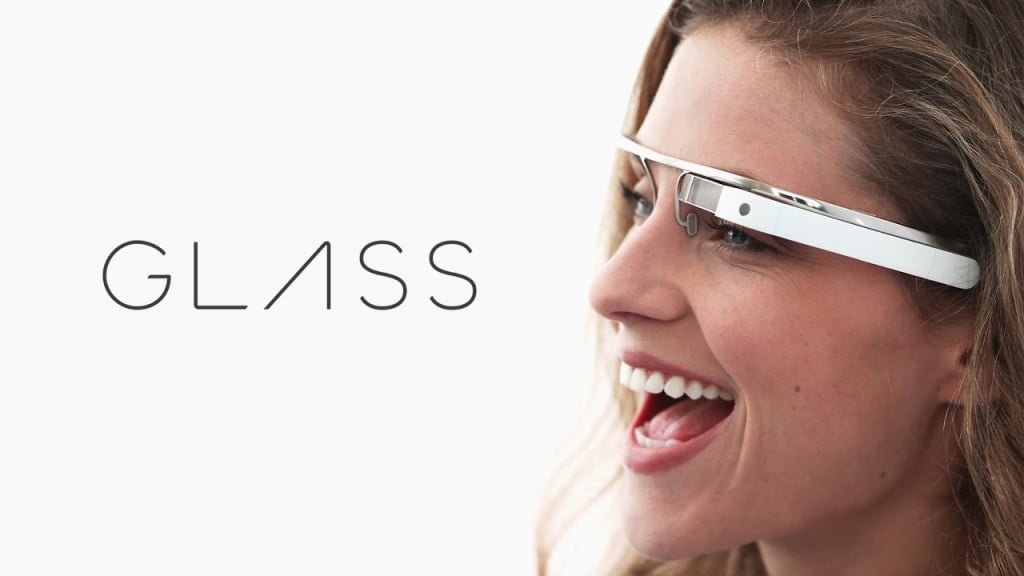
Google Glass is a wearable computer with an optical head-mounted display (OHMD). It was developed by Google with the mission of producing a mass-marketubiquitous computer. Google Glass displays information in a smartphone-like hands-free format. Wearers communicate with the Internet via natural languagevoice commands.


Google provides four prescription frame choice for about $225.00 U.S. It is necessary to remove a small screw in order to move the Google Glass from one frame to another. Google entered in a partnership with eyewear company Luxottica, owners of the Ray-Ban, Oakley, and other brands, to offer additional frame designs. Google sold Google Glass in the USA from 15 April 2014 for a limited period of time for $1500
.

OFFICIAL WEBSITE : http://www.google.com/glass/start/

Monday, 28 May 2012

Facebook Smartphone

The New York Times cited unnamed sources, including Facebook employees, suggesting that the network had been hiring several smartphone engineers.Facebook recently admitted it was struggling to make money out of its growing mobile audience.The company, which recently floated on the stock market, has also just launched its own mobile app store.The App Center currently offers links to Facebook-enabled apps within Apple's iOS and Google Android stores but developers will soon be able to write apps to be placed exclusively in Facebook's store.
According to the New York Times, Facebook has hired experts who worked on the iPhone and other smartphones.
It quoted a Facebook employee as saying the site's founder Mark Zuckerberg was "worried that if he doesn't create a mobile phone in the near future... Facebook will simply become an app on other mobile platforms".


Mobile money
A Facebook smartphone has reportedly been in the works for some time. In 2010, Techcrunch reported that Facebook was "secretly" building a smartphone - although this particular project is said to have broken down. The company's desire to enter the smartphone market could be a result of increasing pressure to improve the potential of mobile to make money. In a statement for potential investors ahead of its initial public offering earlier this month, the company admitted it had concerns about more users accessing Facebook through their mobile - a trend which could make it more difficult to sell advertising. 
When asked by the BBC, a spokeswoman for Facebook said the company did not comment on speculation, and referred instead to a written statement. "Our mobile strategy is simple: we think every mobile device is better if it is deeply social," the statement read. "We're working across the entire mobile industry; with operators, hardware manufacturers, OS providers, and application developers to bring powerful social experiences to more people around the world."


So how it would look?


Monday, 14 May 2012

Google driverless car


          With advancing technology, there are revolutions in the automobile field. To develop a car that can run without driver was one of dreams of automobile world. Many driverless cars were developed in past, but they failed to get license from government to bring it on roads. 

          The Google Driverless Car is a project by Google that involves developing technology for driverless cars. The project is currently being led by Google engineer Sebastian Thrun, director of the Stanford Artificial Intelligence Laboratory and co-inventor of Google Street View. Thrun's team at Stanford created the robotic vehicle Stanley which won the 2005 DARPA Grand Challenge and its US$2 million prize from the United States Department of Defense. The team developing the system consisted of 15 engineers working for Google, including Chris Urmson, Mike Montemerlo, and Anthony Levandowski who had worked on the DARPA Grand and Urban Challenges.

          The U.S. state of Nevada passed a law in June 2011 concerning the operation of driverless cars in Nevada. Google had been lobbying for driverless car laws. The Nevada law went into effect on March 1, 2012, and the Nevada Department of Motor Vehicles issued the first license for a self-driven car in May 2012. The license was issued to a Toyota Prius modified with Google's experimental driver-less technology.

Source:Wikipedia


PHOTO GALLERY


Thursday, 3 May 2012

Longtion Application Builder


          Longtion Application Builder is a tool for designing and developing database applications, Web applications and AutoRun CD Menu without writing any code. And you don't have to be a software programmer to do it. With its intuitive integrated development environment (IDE) and drag-and-drop objects, it's quick to learn and easy to use. It requires no programming knowledge whatsoever! You'll be amazed with the powerful functionality and stylish visual appeal that Longtion Application Builder puts at your mouse-clicking fingertip. Design and distribute your software with a few clicks of the mouse.
          With Longtion Application Builder you can build standalone Web applications exactly the same way you would build normal database applications. It is a revolutionary new way to create web-based applications. The standalone Web application is a web server that run without dependencies from any other web server (IIS or Apache).


Wednesday, 2 May 2012

Vegas Pro

Sony Vegas Pro is the powerful audiovisual editor manufactured by SONY which his mainly oriented to the professional use but of which the amateurs and the enthusiastic users can also take advantage.
This programme has high range capabilities for audio and video processing. It even offers video capture from different devices, subtitles editions, support for multiple audio tracks, sound channels, sound effects, MPEG2 encoding for DVD and many other things.
And, as if all this were not enough, Sony Vegas Pro makes use of additions (“plug-ins”), with which you will be able to expand its functions.
In a few words, SONY Vegas Pro is the most complete edition center for audio and video offered by this prestigious company.
Indispensable requirements for the operation of the Software:
DirectX 9.0c and .NET Framework 3.0 previously installed.


Part- 1     Part- 2     Part- 3     Part- 4 

Part- 5     Part- 6      Part- 7     Part- 8

Vegas Movie Studio HD

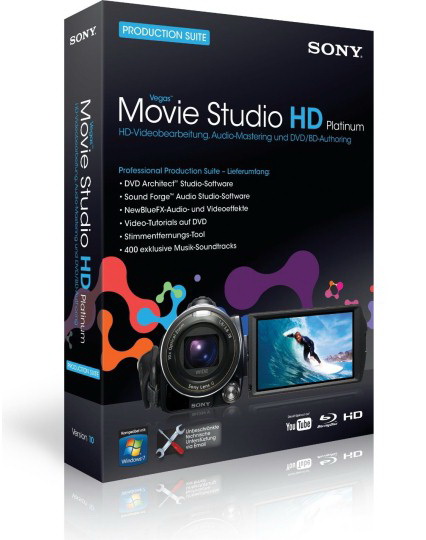
Vegas Movie Studio Platinum Edition software has everything needed to produce spectacular HD movies. You can edit video in nearly any format including HDV and AVCHD. Included are innovative stereoscopic 3D tools, powerful features for video compositing, color correction, and soundtrack creation for feature-film results in your home studio. Use the surround sound mixing tools to create 5.1 soundtracks. Choose from hundreds of professional 2D and 3D video effects, titles, and filters. Upload movies to YouTube™, burn to Blu-ray Disc™, or author DVDs using beautifully designed themes or create custom menus and graphics. Exclusive Sony Show Me How interactive tutorials help you get started fast.

Simple DVD and Blu-ray Disc™ creation
DVD Architect™ Studio software is included so you can easily create and burn professional-looking DVD and Blu-ray Disc projects with custom menus, buttons, backgrounds, and navigation. 56 easy-to-use themes are included to get you started.

Standard or high definition
Edit video in nearly any format including HDV and AVCHD™. Work simultaneously with standard definition and high definition in the same project.

Stereoscopic 3D editing
Create stereoscopic 3D projects as easy as 2D projects, with no additional tools needed. In addition to consumer level delivery formats, Vegas Movie Studio HD Platinum 11 can preview and deliver an anaglyphic project providing customers, without an expensive 3D monitor, the ability to create a 3D project with only a pair of inexpensive red/cyan glasses.

Titles & Text plug-in
Spice up your text events with animations and interesting effects. The Titles & Text plug-in incorporates some of the options of the Pro Type Titler (Vegas Pro), but has an intuitive and easy-to-use interface.

Transport Controls for Trimmer and Video Preview
Transport Controls provide more intuitive and immediate command over editing, as well as improve the overall workflow, productivity, and editing experience.

Enhance and stabilize
Choose from hundreds of professional 2D and 3D video effects, titles and filters. Automated and advanced color-correction tools enhance washed-out footage. Quickly salvage shaky media with video stabilization.

and much more...

Friday, 27 April 2012

Change Windows' Default Sounds


          Are you bored of the windows' default sounds such as sound at windows startup and shutdown? Do you wish a change in it? Do you want to set your favourite tones or replace existing with new one? Yes, you can change it without harming your system. In this post I will help you change your windows' default sounds.

       You can personalize the sounds that your computer makes when different tasks happen, such as when you turn on your computer or when you receive an email or an instant message.To obtain sounds, you can search the web for sound clips from your favorite songs, TV shows, and movies, and then download the clips to your computer. If you want to record your own sound clips, copy sound clips from a CD or DVD, or save anything else you can hear through your computer speakers, you can use Sound Recorder, a basic sound program that comes with Windows XP.


           Sounds have to be in the .wav format; you can't use .mp3 or .wma sounds. Once you've downloaded or recorded some sounds, you can set them up to play in Windows.


How To Change Default Sounds in Windows 7


  1. Open Sound by clicking the Start button Picture of the Start button, and then clicking Control Panel. In the search box, type sound, and then click Sound.
  2. To change one sound, click the Sounds tab, and then, in theProgram Events list, click the event that you want to assign a new sound for.
  3. In the Sounds list, click the sound that you want to associate with the event, and then click OK.
    If the sound you want to use isn't listed, click Browse to locate it.
  4. To change more than one sound, follow the steps above, but clickApply after clicking each sound, until you've made all the changes you want, and then click OK.


    How To Change Default Sounds in Windows XP


    1. Log on to your computer as an administrator. Click Start, and then clickControl Panel.
    2. Click Sounds, Speech, and Audio Devices.
    3. Click Change the sound scheme. The Sounds, Speech, and Audio Devices Properties dialog box appears.
    4. In the Program events list, click an event. Then, click the Play button to listen to the sound currently assigned to the event.
    5. To change the sound, click the Sounds list down arrow, and select a different system sound. To choose a sound that you have downloaded or recorded, click the Browse button, select the sound, and then click OK. Click the Play button again to preview the sound.
    6. When you are satisfied with your sounds, click Save As.
    7. In the Save Scheme As dialog box, type a name for your scheme, and then click OK.
    8. In the Sounds and Audio Devices Properties dialog box, click OK.

Tuesday, 24 April 2012

AV Voice Changer Diamond

          AV Voice Changer Software is useful for users who want to have a fun time online. They can use it toCreate exciting conversation environments while doing voiceChat in instant messenger programs, or to make humorous fun voice chat/voice calls with PC-to-Phone applications, or to do song remixes to renew your favorite songs, etc.


          AV Voice Changer Software stands apart from other online or computer-based voice changing programs because of its unlimited ability to change and enhance voices and sounds, and its ability to produce high quality audio output. Outstanding features:In real time, change your voice to female or male for voice chat, phone, online games using the dual voice changer algorithms: Hooking and Virtual Audio Driver.Change voice's gender and age to have fun in voice chat with "quick" nickvoices.


          Create different human and non-human voices for dubbing.Morph songs and voices in songs.Create your own, high quality voice-overs for Movie, radio, narration, and more. Live your life in games like Second Life easier with Game mode.Record voice chat, phone conversation, Internet Radio, streaming audio.Add audio and background effects while you talk and sound like you are somewhere else.Compare changed voice to another's voice for simulation purposes.Compatible with most instant messengers, PC to phone clients, game servers, and media players.


New features:
Superb voice changing algorithms.
Game mode optimized for online games.
Customized "quick" nickvoices.
Non-human voices.
New background effects.